Your Selected Vehicle
Parts for your 2010 Honda Civic-Batteries



30%OFF
Drivetech 4x4 OE Style Switch UHF RJ45 Socket, Suits Toyota and Mitsubishi - DT-11105
$32.20
$46

30%OFF
Drivetech 4x4 OE Style Push Button Switch Driving Lights, Suits Toyota and Mitsubishi - DT-11002
$23.10
$33


30%OFF
Drivetech 4x4 OE Style Push Button Switch Lightbar, Suits Toyota and Mitsubishi - DT-11081
$23.10
$33

30%OFF
Drivetech 4x4 OE Style Push Button Switch Aux Lights Symbol Suits Toyota and Mitsubishi - DT-11078
$23.10
$33


30%OFF
Drivetech 4x4 Dual USB Socket 2.1A Per USB - Panel Mount with Voltmeter - DT-11025
$37.80
$54

30%OFF
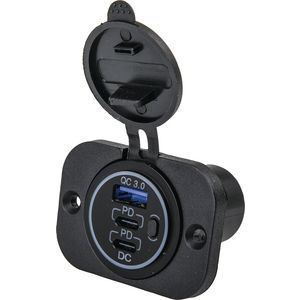
Drivetech 4x4 QC3.0 Quick Charge USB, Type-C Port and Voltage Display Power Socket - DT-17103
$30.80
$44

30%OFF
Drivetech 4x4 Rocker Fog Lights Switch On/Off SPST 12 or 24V Blue Illumination (Contacts Rated 20A @ 12V) - DT-11020
$21.70
$31


30%OFF
Drivetech 4x4 OE Style Push Button Switch Roof Lights, Suits Toyota and Mitsubishi - DT-11082
$23.10
$33

30%OFF
Drivetech 4x4 Rocker Driving Lights Switch On/Off SPST 12 or 24V Blue Illumination (Contacts Rated 20A @ 12V) - DT-11008
$21.70
$31


30%OFF
Drivetech 4x4 OE Style Push Button Switch Aux Lights Symbol Suits Toyota - DT-11019
$26.60
$38

30%OFF
Drivetech 4x4 Rocker Winch Switch Mom On/Off Mom On SPDT 12 or 24V Blue Illuminated (Contacts Rated 20A @ 12V) - DT-11007
$30.10
$43


30%OFF
Drivetech 4x4 Rocker 4 Switch Panel On - Off - SPST 12 or 24V Blue Illumination (Contacts Rated 20A @ 12V) - DT-11030
$105
$150


30%OFF
Drivetech 4x4 OE Style Push Button Switch Beacon, Suits Toyota and Mitsubishi - DT-11077
$23.10
$33


30%OFF
Drivetech 4x4 Rocker Beacon Switch On/Off SPST 12 or 24V Blue Illumination (Contacts Rated 20A @ 12V) - DT-11012
$21.70
$31

30%OFF
Drivetech 4x4 OE Style Push Button Switch Auxiliary Lights, Suits Holden and Isuzu - DT-11086
$26.60
$38

30%OFF
Drivetech 4x4 Rocker AUX Lights Switch On/Off SPST 12 or 24V Blue Illumination (Contacts Rated 20A @ 12V) - DT-11013
$21.70
$31


Product added to cart
Understanding the Battery in the 2010 Honda Civic
The 2010 Honda Civic, like most petrol-powered vehicles, relies on a battery to get the ride started and keep its electrical systems humming. So, yes, batteries are very much relevant and essential to the operation of this popular compact car.
Under the bonnet of the 2010 Honda Civic, you'll find a 12-volt lead-acid battery. This battery acts as the heart of the vehicle's electrical system, supplying power when the engine is off and providing the initial burst of energy to start the engine. Essentially, it powers everything from the ignition system to the lights, radio, and onboard computers when the alternator isn't running. Once the engine is fired up, the alternator takes over, charging the battery and keeping these systems powered during your drive.
So why is the battery so important, and why should you care about its condition? Think of the battery as the starting point for your car's life each day. A healthy battery ensures you can get on the road without a fuss. A weak or failing battery, on the other hand, can leave you stranded with a no-start situation, especially in colder weather or after long periods of inactivity.
When it comes to maintaining the battery in a 2010 Honda Civic, there are a few key points owners should keep in mind. Batteries naturally lose their ability to hold a charge over time, generally lasting around three to five years depending on usage, climate, and care. Regular inspections and basic maintenance can help extend the life of your battery and save you from inconvenient roadside dramas.
Here are some practical tips for looking after the battery in a 2010 Honda Civic:
- Check the battery terminals regularly. Corrosion, which looks like a white or bluish powdery deposit around the connections, can interfere with the flow of electricity. Cleaning the terminals with a proper battery cleaner or a baking soda solution can help maintain a good connection.
- Ensure the battery is securely mounted. Vibrations from a loose battery can damage its internals and reduce its lifespan.
- Keep the battery charged, especially if the car is left unused for extended periods. Using a battery maintainer or trickle charger can prevent the battery from draining completely.
- Have the battery tested as part of regular servicing. Mechanics can perform load tests to check the battery's health and capacity to hold charge, giving you a heads-up before it fails completely.
- Be mindful of electrical usage when the engine is off. Leaving lights or accessories on can drain the battery quickly.
When it comes time for a replacement, choosing the right battery for the 2010 Honda Civic is straightforward but important. The replacement battery should meet the manufacturer's specifications for size, cold cranking amps (CCA), and reserve capacity. Using the correct battery ensures reliable starts and long service life. Many auto parts stores and service centres in Australia stock compatible batteries, and Honda dealerships can provide original equipment replacements.
If a Civic owner notices dimming lights, slow engine crank, or warning lights related to the charging system on the dashboard, it's a good idea to have the battery and charging system checked. While a failing battery is a common culprit, sometimes the alternator or other electrical components can cause similar symptoms.
Overall, the battery in a 2010 Honda Civic plays a crucial role beyond just starting the car. It keeps all electrical systems functioning smoothly during startup and downtime, making it a vital component that deserves regular attention. Taking simple steps to inspect, clean, and test the battery during routine servicing can prevent unwanted surprises and keep your Civic running reliably on Aussie roads.
Popular Searches


