Your Selected Vehicle
Parts for your 2000 Nissan Bluebird-Batteries



30%OFF
Drivetech 4x4 OE Style Switch UHF RJ45 Socket, Suits Toyota and Mitsubishi - DT-11105
$32.20
$46

30%OFF
Drivetech 4x4 OE Style Push Button Switch Driving Lights, Suits Toyota and Mitsubishi - DT-11002
$23.10
$33


30%OFF
Drivetech 4x4 OE Style Push Button Switch Lightbar, Suits Toyota and Mitsubishi - DT-11081
$23.10
$33

30%OFF
Drivetech 4x4 OE Style Push Button Switch Aux Lights Symbol Suits Toyota and Mitsubishi - DT-11078
$23.10
$33


30%OFF
Drivetech 4x4 Dual USB Socket 2.1A Per USB - Panel Mount with Voltmeter - DT-11025
$37.80
$54

30%OFF
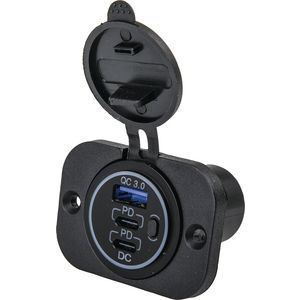
Drivetech 4x4 QC3.0 Quick Charge USB, Type-C Port and Voltage Display Power Socket - DT-17103
$30.80
$44

30%OFF
Drivetech 4x4 Rocker Fog Lights Switch On/Off SPST 12 or 24V Blue Illumination (Contacts Rated 20A @ 12V) - DT-11020
$21.70
$31


30%OFF
Drivetech 4x4 OE Style Push Button Switch Roof Lights, Suits Toyota and Mitsubishi - DT-11082
$23.10
$33

30%OFF
Drivetech 4x4 Rocker Driving Lights Switch On/Off SPST 12 or 24V Blue Illumination (Contacts Rated 20A @ 12V) - DT-11008
$21.70
$31


30%OFF
Drivetech 4x4 OE Style Push Button Switch Aux Lights Symbol Suits Toyota - DT-11019
$26.60
$38

30%OFF
Drivetech 4x4 Rocker Winch Switch Mom On/Off Mom On SPDT 12 or 24V Blue Illuminated (Contacts Rated 20A @ 12V) - DT-11007
$30.10
$43


30%OFF
Drivetech 4x4 Rocker 4 Switch Panel On - Off - SPST 12 or 24V Blue Illumination (Contacts Rated 20A @ 12V) - DT-11030
$105
$150


30%OFF
Drivetech 4x4 OE Style Push Button Switch Beacon, Suits Toyota and Mitsubishi - DT-11077
$23.10
$33


30%OFF
Drivetech 4x4 Rocker Beacon Switch On/Off SPST 12 or 24V Blue Illumination (Contacts Rated 20A @ 12V) - DT-11012
$21.70
$31

30%OFF
Drivetech 4x4 OE Style Push Button Switch Auxiliary Lights, Suits Holden and Isuzu - DT-11086
$26.60
$38

30%OFF
Drivetech 4x4 Rocker AUX Lights Switch On/Off SPST 12 or 24V Blue Illumination (Contacts Rated 20A @ 12V) - DT-11013
$21.70
$31


Product added to cart
Maintaining Your 2000 Nissan Bluebird's Battery
The battery is a crucial component of your 2000 Nissan Bluebird, ensuring that your car starts smoothly every time. Over time, maintaining or replacing your car battery becomes an essential aspect of servicing your vehicle. Here's everything you need to know about keeping your Bluebird's battery in top condition.
Choosing the right battery for your Nissan Bluebird is the first step. It's important to select a battery that matches the specifications recommended for your vehicle. This means considering factors like size, voltage, and the Cold Cranking Amps (CCA). Typically, a 12-volt battery with appropriate CCA for a mid-sized car like the Bluebird will suffice.
Now, let's talk about maintaining your car battery. Regular checks are pivotal to prolonging battery life. Here are some key tips:
- Inspect for Corrosion: Check the battery terminals and cables regularly for signs of corrosion. Cleaning off any build-up with a mixture of baking soda and water ensures better connectivity.
- Check the Fluid Level: If your battery isn't a maintenance-free type, keep an eye on the electrolyte levels. Top it off with distilled water if necessary to maintain optimal performance.
- Test the Battery: Use a voltmeter to check your battery's charge. A fully charged car battery typically reads over 12.6 volts. Anything less might suggest it's time for a recharge or replacement.
Now and then, replacing your battery becomes inevitable. Here's a simple guide for when it's time:
- Turn off Your Car: Ensure the engine is off and keys removed from the ignition.
- Disconnect the Battery: Always disconnect the negative terminal first, followed by the positive terminal.
- Remove the Old Battery: Take care when lifting the old battery as they can be heavy and may have some residual charge.
- Install the New Battery: Place the new battery in the tray, ensuring it's secure. Connect the terminals starting with the positive terminal, then the negative.
- Test the Installation: Start your car to ensure the new battery is functioning properly.
Regular battery maintenance doesn't just ensure your car starts each morning - it helps avoid inconvenient breakdowns and prolongs the life of your vehicle. Taking these small yet significant steps can save you from unexpected surprises and keep your Nissan Bluebird running smoothly year after year.
Popular Searches


